> ## Documentation Index
> Fetch the complete documentation index at: https://docs.crafter.net.tr/llms.txt
> Use this file to discover all available pages before exploring further.
# Discord Bot & Server Linking
> Link your website with your Discord community server for one-click OAuth2 logins and automatic role sync.
The Crafter Discord Bot module bridges your web platform with your Discord community through the official Crafter Bot. It enables one-click OAuth2 authentication, 2FA code delivery, and automatic role sync for store rank purchases.
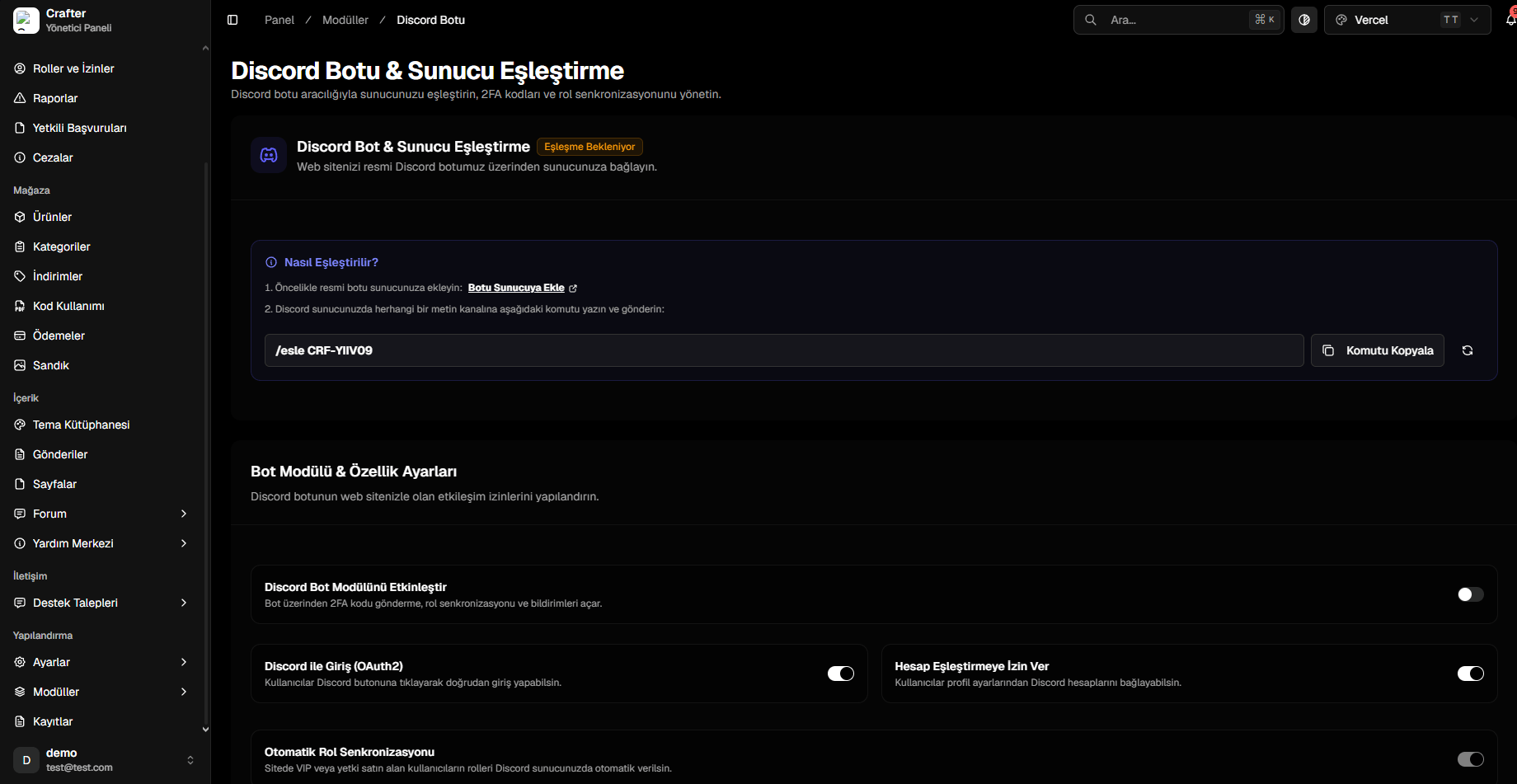
Navigate to [Dashboard > Modules > Discord Bot](https://app.crafter.net.tr/tr/dashboard/modules/discord-bot) to link the bot.
 ***
## Server Linking Steps
Use the official authorization link to invite the bot with Administrator
permissions:
Click to invite Crafter Bot to your Discord server.
1. Copy your unique pairing code displayed in the dashboard (e.g., `/esle
CRF-YIIV09` or `/link CRF-...`). 2. Run this slash command in any text
channel on your Discord server. 3. The status indicator will turn green
**Paired** upon verification.
***
## Bot Features & Permissions
* **Enable Discord Bot Module (Toggle):** Enables role sync, direct message alerts, and 2FA code delivery.
* **Discord OAuth2 Login (Toggle):** Adds a *"Sign In with Discord"* button on login and registration pages.
* **Allow Account Linking (Toggle):** Enables players to connect their Discord account in their web profile.
* **Automatic Role Sync (Toggle):** Grants Discord roles automatically when a player buys VIP ranks, and revokes them upon package expiration.
Ensure the **Crafter Bot** role is placed **above** all VIP and rank roles in
your Discord Server Settings hierarchy.
***
## Server Linking Steps
Use the official authorization link to invite the bot with Administrator
permissions:
Click to invite Crafter Bot to your Discord server.
1. Copy your unique pairing code displayed in the dashboard (e.g., `/esle
CRF-YIIV09` or `/link CRF-...`). 2. Run this slash command in any text
channel on your Discord server. 3. The status indicator will turn green
**Paired** upon verification.
***
## Bot Features & Permissions
* **Enable Discord Bot Module (Toggle):** Enables role sync, direct message alerts, and 2FA code delivery.
* **Discord OAuth2 Login (Toggle):** Adds a *"Sign In with Discord"* button on login and registration pages.
* **Allow Account Linking (Toggle):** Enables players to connect their Discord account in their web profile.
* **Automatic Role Sync (Toggle):** Grants Discord roles automatically when a player buys VIP ranks, and revokes them upon package expiration.
Ensure the **Crafter Bot** role is placed **above** all VIP and rank roles in
your Discord Server Settings hierarchy.