> ## Documentation Index
> Fetch the complete documentation index at: https://docs.crafter.net.tr/llms.txt
> Use this file to discover all available pages before exploring further.
# Security Settings
> Registration access controls, IP account limits, CrafterConnect plugin bridge, and Cloudflare Turnstile bot protection.
The Crafter Security Settings module allows you to configure player registration policies, prevent spam bot registrations, and secure communication channels between your game servers and Crafter plugins.
Navigate to [Dashboard > Settings > Security](https://app.crafter.net.tr/tr/dashboard/settings/security) to manage security rules.
 ***
## 1. Access Control (Registration Policies)
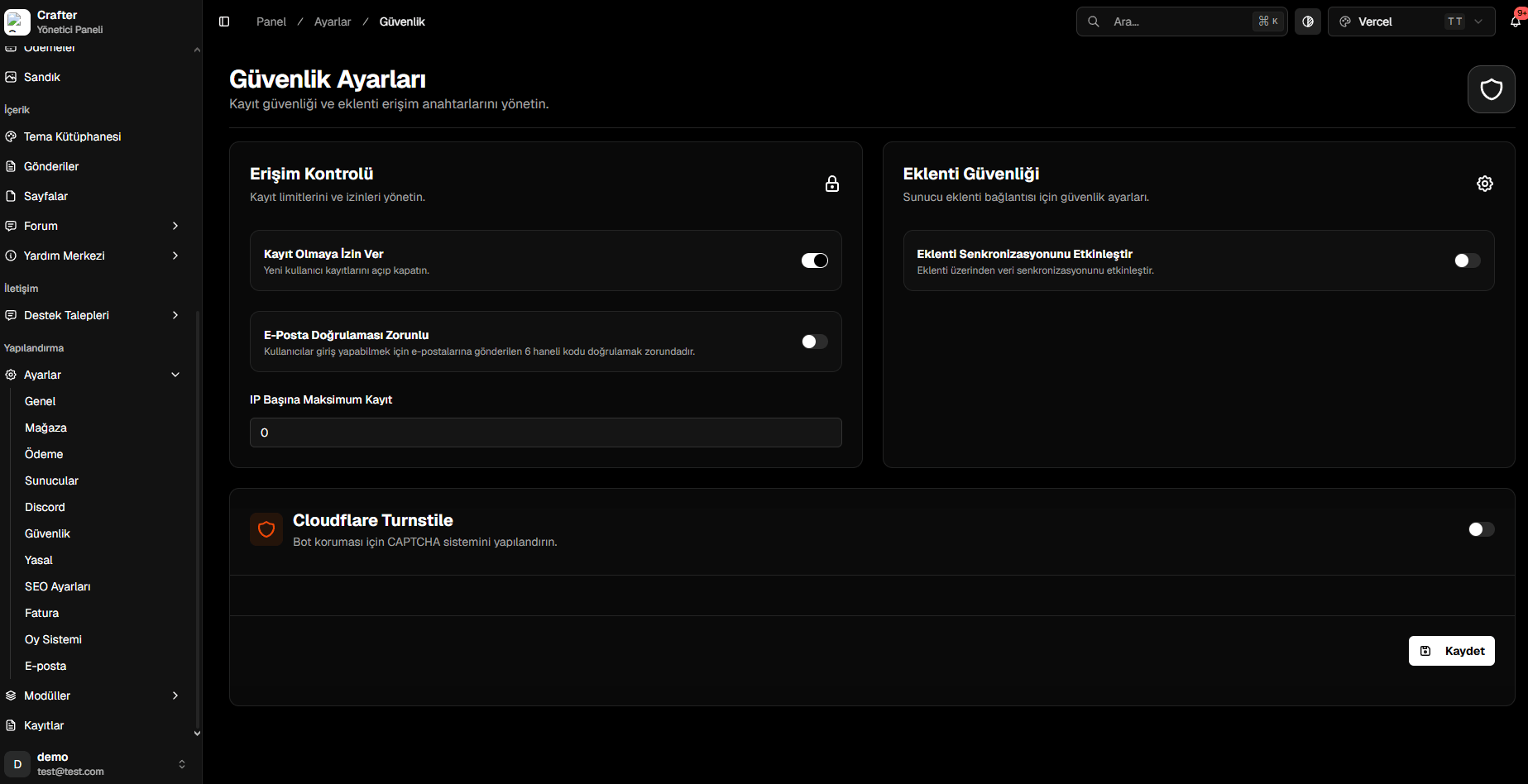
* **Allow Registration (Toggle):** Instantly enable or lock new user account registrations.
* **Require Email Verification (Toggle):** Mandate 6-digit confirmation codes sent to the player's email before granting login access.
* **Max Registrations Per IP:** Limit maximum accounts that can be registered from a single IP address (`0` for unlimited).
***
## 2. Plugin Security (CrafterConnect)
* **Enable Plugin Synchronization (Toggle):** Must be enabled for `CrafterConnect` and official plugins to synchronize commands and data with the website.
* When disabled, all external incoming plugin API requests are immediately blocked.
For detailed plugin installation and token configuration steps, review our [Minecraft Server Setup Guide](/en/game-servers/minecraft).
***
## 3. Cloudflare Turnstile (Bot Protection)
Protects all forms (Registration, Login, Applications) with invisible, privacy-first CAPTCHA.
* **Cloudflare Turnstile (Toggle):** Enable bot protection.
* Paste your **Site Key** and **Secret Key** generated from your Cloudflare dashboard.
Read the step-by-step guide on creating Turnstile widgets and obtaining API keys.
***
## 1. Access Control (Registration Policies)
* **Allow Registration (Toggle):** Instantly enable or lock new user account registrations.
* **Require Email Verification (Toggle):** Mandate 6-digit confirmation codes sent to the player's email before granting login access.
* **Max Registrations Per IP:** Limit maximum accounts that can be registered from a single IP address (`0` for unlimited).
***
## 2. Plugin Security (CrafterConnect)
* **Enable Plugin Synchronization (Toggle):** Must be enabled for `CrafterConnect` and official plugins to synchronize commands and data with the website.
* When disabled, all external incoming plugin API requests are immediately blocked.
For detailed plugin installation and token configuration steps, review our [Minecraft Server Setup Guide](/en/game-servers/minecraft).
***
## 3. Cloudflare Turnstile (Bot Protection)
Protects all forms (Registration, Login, Applications) with invisible, privacy-first CAPTCHA.
* **Cloudflare Turnstile (Toggle):** Enable bot protection.
* Paste your **Site Key** and **Secret Key** generated from your Cloudflare dashboard.
Read the step-by-step guide on creating Turnstile widgets and obtaining API keys.